A repair-shop booking portal with private customer requests
Reproduce a repair booking portal that saves private requests, survives a reload and refuses a direct record link in another visitor’s session.
By Uvilno · 7 min read · Published
Read as MarkdownBuild a request portal a customer can come back to
A small repair shop can start with a form that collects the service, a preferred date and a short description of the problem. Give each visitor a private history so they can look up their request later. Label the result Request received after the write succeeds. An appointment requires a separate confirmation from the shop.
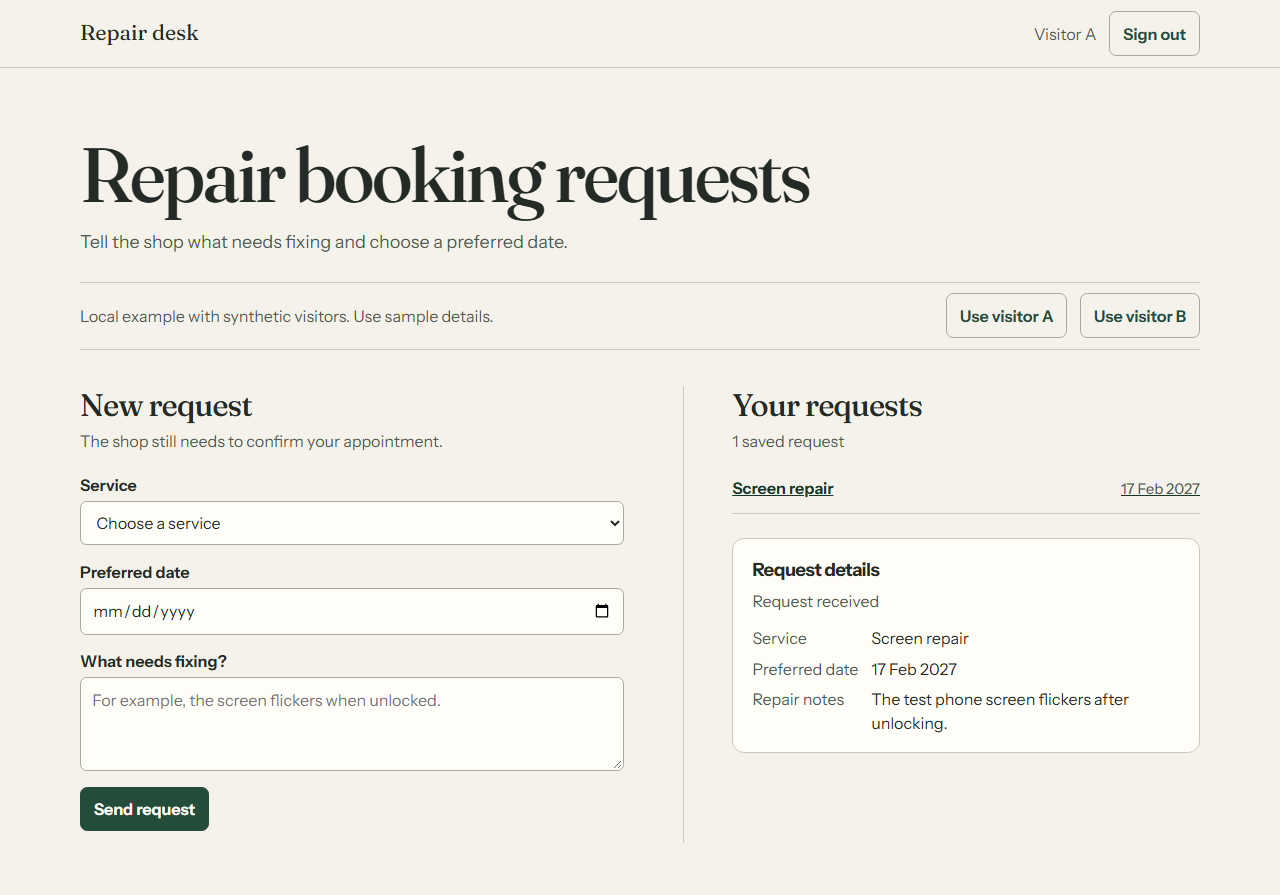
We hand-authored this internal example and ran it in Chromium against Uvilno’s managed-record SQL in a local PostgreSQL fixture. Two synthetic visitor sessions exercised the same app. One submitted a request, opened it again after reloading and retrieved it in a fresh browser context. The other received no record when it opened the exact same detail URL.
Keep visitor identity outside the request form
The form and request list share a page. Each list entry links to a detail view by record ID, so an authorized visitor can bookmark it. The empty state prompts the visitor to submit a first request. The form reports a save error in place and leaves the submitted values available for correction.
The app calls create, list and get on the same Uvilno entity runtime used for managed records. A loopback test server resolves the actor from a fixture session cookie, validates the request and supplies the actor and pinned project version to the managed-record SQL. The read functions apply the private collection’s ownership filter on the server, including reads by ID. The browser has no way to supply the owning visitor as a form field.
Scroll sideways for all columns.
| Field or metadata | Where it comes from | How the portal uses it |
|---|---|---|
| Service | A required choice from three repair services | Name the request in the list and detail view |
| Preferred date | A validated calendar date | Show the visitor’s preferred day |
| Repair notes | Five to 240 characters after trimming | Show the description in the private detail view |
| Record ID and owner | Database-generated ID and server-resolved visitor | Resolve the direct detail link within that visitor’s records |
| Request ID | The managed data client’s create operation | Return the original record on an exact submission replay |
What the browser and database checks observed
The fixture runs Uvilno’s checked-in managed-record migrations in PGlite. It exercises the data client and SQL with an in-memory PostgreSQL database and no remote service. The record remains available across pages and browser sessions for the life of that database process. Stopping the process clears the sample data.
In the follow-up run, visitor B created a separate request. The browser verified that B could still open that request immediately after A’s known link was denied. This positive control confirms B’s session and access to its own records were working during the denial check.
The browser checks used 390 px and 1280 px viewports. Both views fit their viewport width and produced zero axe violations in the tested states. The run recorded no page errors or outbound browser requests.
Scroll sideways for all columns.
| Check | Observed result |
|---|---|
| Guest reads the private collection | The API returns HTTP 401. The browser form is disabled until a visitor is selected. |
| Visitor A submits and reloads | One row appears in the list and the same detail remains available after reload. Browser local storage stays empty. |
| The original create request is replayed | The response returns the same record ID and the list still has one row. Reusing that request ID with altered notes returns HTTP 409. |
| A direct API request supplies an invalid date | The fixture rejects the request with HTTP 400. |
| Visitor B opens A’s exact detail link | The API returns a null record and the page shows Request unavailable for this visitor. |
| Visitor A signs out, then returns in a fresh browser context | The signed-out page hides the data. Selecting A in the fresh context restores the record from the running database. |
Run the same checks locally
The exact fixture requires access to the Uvilno repository. From a checkout with workspace dependencies installed, use Node.js 22.22.2 or 24.15.0 and pnpm. The first command starts a loopback server and prints its address. Use two browser profiles with the synthetic visitor controls. The second command runs the browser checks independently in a separate terminal and saves captures under artifacts. If Chromium is missing, install it with pnpm --dir apps/web exec playwright install chromium. To repeat the same experiment on your own app, use the public worksheet linked below.
pnpm --dir apps/web exec tsx --tsconfig tsconfig.json scripts/repair-shop-portal/fixture.ts
pnpm --dir apps/web exec tsx --tsconfig tsconfig.json scripts/repair-shop-portal/verify.mts- In the first profile, choose visitor A. Create a screen repair request with a date and sample notes.
- Open its saved detail and reload. Copy the request URL into a second profile, then choose visitor B.
- Check that the second profile has an empty request list and cannot read A’s details. Switch the second profile to A and confirm the record appears again.
Record the same isolation check for a release candidate
Use the evidence template with two disposable accounts and synthetic records on an app you control. Set expectedRevision to the candidate’s build label and choose local, preview, published-test or final-hostname. Use one report per revision and test surface. Give the two records distinct aliases and fill each check with its observed revision, scope and record alias. Keep raw URLs, account identifiers, headers and record values out of the report.
First reopen A’s record from a fresh A session. Then in a separate B session open B’s own record, open A’s exact link and reopen B’s own record. Finally sign out and open A’s link again. Observe both the UI and the service response for each step. For own-record checks use match when the expected record and synthetic fields appear, or mismatch when they differ. For denial checks use withheld for an intentional denial or empty result, or disclosed if any private field appears. Use unavailable for a broken request or missing observation and unrun for a check you skipped. A crash or timeout can’t establish isolation.
Save the script and JSON file in a fresh folder. The script and template are available under the MIT terms included in the script. Run the commands below with Node.js 22 or later. The checker reads only the local report and exits 0 when all five checks pass, 1 if any finding is blocked or inconclusive, and 2 for invalid input. It checks the completeness and consistency of the observations you enter. Sign-in providers, cross-account writes and production rollout need their own tests.
npm init -y
npm install --ignore-scripts --save-exact zod@4.6.7
node app-isolation-check.mjs app-isolation-evidence.jsonTurn the example into your own app in Studio
Start a project with the portal brief below. In Plan mode, check that it specifies a private collection, a sign-in state and a detail route that reads through the authenticated data client. Review the generated form, request history and direct detail links in preview. Use two real test app visitors to verify authorization independently of the preview persona selector.
Select the saved version you want to share and enable its live URL in Publish Studio. At that address, repeat sign-in, create, reload, the second visitor’s direct-link attempt and sign-out. Provider configuration, return origins and delivery for email-based flows need their own checks. The fixture’s account selector substitutes for a provider, and the local run did not exercise publishing, DNS or a production deployment.
For your own domain, verify the published Uvilno URL first. Save the custom-domain plan in Publish Studio, apply the ownership TXT and routing record shown for your hostname, and verify the connection. Domain activation requires a published live link and an eligible project unlock or paid plan. Repeat the visitor and request checks on the final HTTPS hostname.
If the shop later needs staff approval, define which staff identity can change confirmation state and enforce that permission on the server. Include two staff members and two visitors in that acceptance test. Add slot availability or email delivery only when the application has a server-verified source for each outcome.
Common questions
Does submitting a repair request reserve a time?
The example stores a preferred date and shows an acknowledged request. A real appointment needs an authorized confirmation and an availability check if the shop offers reserved slots.
Can someone read the request if they know its URL?
In the local run, a second fixture visitor opened the exact URL and received no record. The server looks up the record within the requesting visitor’s authorized scope. Repeat the same test with real app accounts on your published host.
Do I need a Supabase account to run the example?
The loopback example uses the repository’s PGlite test database and requires no remote database account. Use the live app’s managed data and visitor account setup for a published project.
Prepare your own brief
Adapt this starting point to your project. You can name the project and review the text before you explicitly send a build.